XenApp 6 – CPU Usage Management & Virtual memory optimization

En este documento veremos dos formas de optimizar nuestras granjas de XenApp mediante un par de directivas de Citrix, la Administración del uso de CPU e implementando la optimización de la memoria virtual. Con la primera administraremos el uso de la CPU donde podremos administrar el % de uso compartido por usuario para evitar que los consumos altos de CPU afecten al resto de usuarios consiguiendo además una mayor capacidad por servidor. Optimizando la memoria virtual mejoraremos el uso compartido de ficheros DLL entre las aplicaciones que se ejecutan, ahorrando ambas memorias (virtual y real).
Administrando el uso de CPU,
El servidor administra el % de uso compartido de la CPU asignado a cada usuario (por defecto todos usan el mismo %) And thus user activity will not affect the rest, Ensuring a fair distribution. We will not enable it when we need applications that consume a lot of CPU or users who need more than the others. Citrix Team Policy in 'Server Configuration' > 'Memory/CPU':

Applicable to XenApp 6.0 or later and XenDesktop
Specifies the level of CPU usage management on the server. CPU resource management can normalize CPU peak activity and reduce the resources needed to handle them. You can choose from:
* No CPU usage management
* Equal CPU allocation between sessions: To assign the same amount of CPU to each user.
* Preferred load balancing: Para asignar recursos según los niveles de importancia.
Virtual memory optimization,
Al habilitar la optimización de memoria modificaremos la ubicación de las DLL en la memoria para intentar ser compartidas, esta función es interesante en el caso de disponer menos RAM de la necesaria y perdamos rendimiento. Además deberemos tener en cuenta que no funciona con todas las aplicaciones, estas las podremos agregar a una lista de exclusión, las detectaremos basicamente pq antes de activar dicha directiva funcionaban 😉 Tipos de aplicaciones que no podrían optimizarse: las que se ubican en carpetas de red, que tienen componentes firmados digitalmente, o que estén protegidos por la herramienta de derechos de Windows… Compuesta por dos partes: first, a component that detects the modules that can be modified and second, the rewriting component which performs optimization programmatically. Citrix Team Policies in 'Server Configuration'’ > 'Memory/CPU':
Applicable to XenApp 6.0 or later and XenDesktop
Enable or disable memory optimization. When memory optimization is enabled, the ability to manage the placement of DLLs in both physical and virtual memory is improved, creating shared DLLs for applications open in multiple sessions.
If you enable memory optimization, you can use other parameters to specify when memory optimization should run and which applications should be excluded from it (when appropriate).
Related policies:
* List of applications excluded from memory optimization
* Memory optimization interval
* Memory optimization scheduling: Day of the week
* Memory optimization scheduling: Day of the month
* Memory optimization scheduling: hour

Applicable to XenApp 6.0 or later and XenDesktop
Specifies the applications that should be ignored by memory optimization. Applications can be added, modified, or removed from the list.
Related policies: Memory optimization

Applicable to XenApp 6.0 or later and XenDesktop
If memory optimization is enabled, this parameter specifies its execution interval. This parameter is added to the 'run at startup' option, which always occurs when memory optimization is enabled. You can choose from:
* Daily
* Weekly
* Monthly
Related policies: Memory optimization

Applicable to XenApp 6.0 or later and XenDesktop
If memory optimization is enabled, and its interval is defined as 'Weekly', este parámetro especifica el día de la semana en que se ejecuta la optimización de memoria.
Related policies:
* Memory optimization
* Memory optimization interval

Applicable to XenApp 6.0 or later and XenDesktop
Si el parámetro Otimización de memoria está habilitado y el Intervalo de optimización de memoria está definido como Mensual, esta configuración especifica qué día del mes (entre el 1 and the 31) se ejecuta la optimización.
Si el día especificado no existe en un determinado mes (For example, The day 30 en febrero o el 31 en abril o junio), la optimización de memoria no se ejecutará ese mes.
Related policies:
* Memory optimization
* Memory optimization interval

Applicable to XenApp 6.0 or later and XenDesktop
If memory optimization is enabled, y el intervalo de la misma está definido como “Diario”, “Semanal” o “Mensual”, este parámetro especifica la hora del día a la que se ejecuta la optimización de memoria. El formato de la hora es H:MM TT, donde H es la hora, MM are the minutes and TT is the part of the day (AM or PM).
Memory optimization hours are scheduled according to the server's local time zone and use a clock of 12 hours. If you enter a clock time of 24 hours, it will automatically be converted to its corresponding clock value of 12 hours. If you enter a time without a TT value, AM is taken as the default.
Related policies:
* Memory optimization
* Memory optimization interval

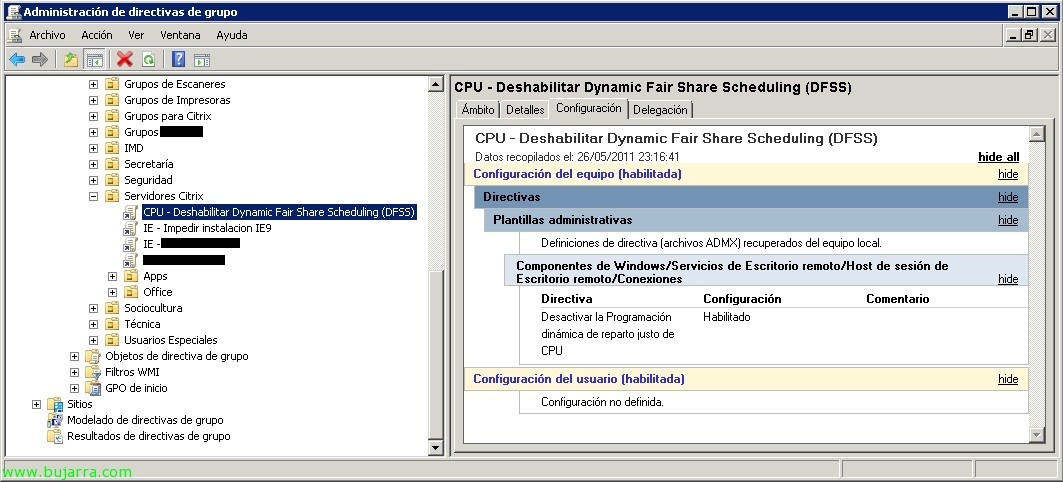
If we have XenApp 6, we should disable the function “Dynamic CPU Fair Share Scheduling” (Dynamic Fair Share Scheduling – DFSS) by Microsoft since before starting the Citrix CPU Management service it checks if it is enabled and it would not start giving us an error. We can disable DFSS with a GPO or by modifying the computer registry by changing the 'EnableCpuQuota' entry’ en ‘HKLMSYSTEMCurrentControlSetControlSession ManagerQuota System’ with a 0.