
Migrate a Windows CA or Certificate Authority 2000 to Windows 2003

En este procedimiento se explica como migrar una CA de un servidor a otro. Si tenemos una CA en un MS Windows 2000 Server, la única manera para migrar esa CA a un MS Windows 2003, is updating the server, para que haga los cambios oportunos, and once that server is migrated, movieríamos la CA a otro servidor basado en 2003 through the following explanations.

Una vez migrado si es que fuera necesario el servidor basado en MS Windows 2000 a MS Windows 2003, abriíamos la consola de la CA, for this: “Beginning” > “Programmes” > “Administrative tools” > “Entidad emisora de certificados”. Todo esto es para exportar las configuraciones a un fichero y después poder recuperarlo en otro servidor.

Sobre el servidor del que queremos realizar el backup, Right Button > “Todas las tareas” > “Realizar copia de seguridad de la entidad emisora de certificados…”
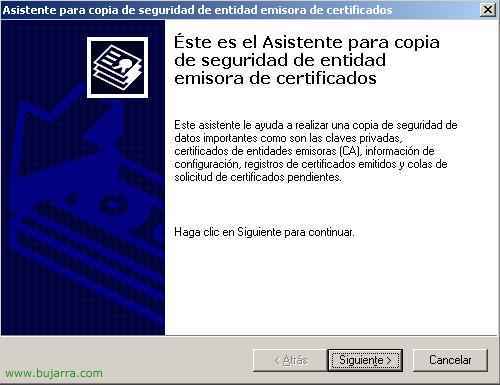
“Following”

Marcamos los dos checks y metemos un PATH para que nos guarde ahi toda la info necesaria para migrar la CA a otro server.

Metemos una clave por si alguien intenta restaurar la CA donde no deba ser y se haga con nuestros certificados.

End

…esperamos mientras hace el backup…

Vale, vemos que nos genera un fichero y una serie de directorios en el PATH de backup

Ahora a parte de eso, hay que exportar una rama del registro, for this, abrimos el registro, “Beginning” > “Execute” > ‘regedit’ and “Accept”

Buscamos esta ruta (y sobre ella, right button and “Export”):
HKEY_LOCAL_MACHINESYSTEMCurrentControlSetServicesCertSvcConfiguration

Le indicamos un nombre por ejemplo “CAregister.reg”
Vale, ahora ya tenemos los datos necesarios copiados, now we forget about the old server and disconnect it from the network, we put in the new one and will restore on it everything generated previously.
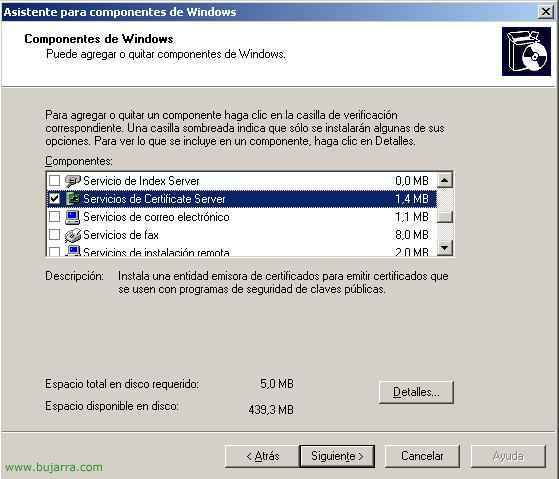
Vale, pues lo dicho, We're going to “Panel de Control”, a “Add or remove programs” y luego a la derecha a “Add or remove Windows components”, seleccionamos el componente de la CA “Certificate Server Services” and we give “Following”.

Yes

We select the first option, “Entidad emisora raíz de la empresa” and we continue,

We give a name to the CA, a la Entidad emisora de certificados, the most normal thing is to put the company name, y le damos una validez a los certificados, lo más normal uno, dos o un máximo de 5 years, It could be dangerous in case some certificate gets stolen without us noticing, Following. Although really all of this doesn't matter because later we will restore the backups we have and they will overwrite it. Following.

Vale, These are the PATHs where the database of the certificates and the logs will be stored, Continue.

Yes

Hope…

End,

And now, Once the new CA is installed on the new server, We have to stop the CA services to be able to restore all previous backups, So, to stop the CA service, We go to Services: “Beginning” > “Execute” > 'services.msc'’ and “Accept”.

We look for the “Certificate Server Services” And on it, Right-click > “Detain”.

Hope…

And once the service is stopped, We will restore the configurations, first, on the backup log file, that we had before (CAregister.reg), right button and “Merge”.

Yes so that it adds the information from that file to our disk.

Accept

Vale, And now, we open the CA console (“Beginning” > “Programmes” > “Administrative tools” > “Certificate authority); on the CA server, Right Button > “Todas las tareas” > “Restore the certificate authority…”

Following

We check both boxes, y seleccionamos el PATH donde está el backup que hemos realizado antes sobre el otro servidor de CA (nuestro original), and we continue.

Metemos la clave que hemos generado antes para que nadie nos robe los certificados…
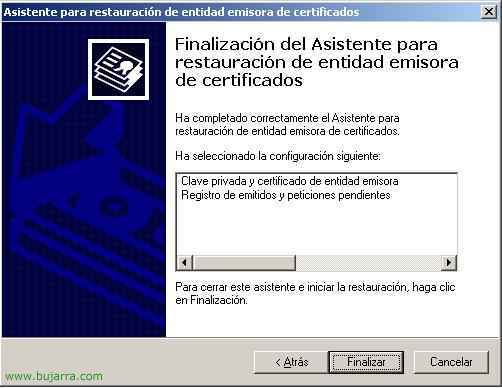
End

Vale, todo perfecto, sin problemas, le decimos que sí, que ya puede iniciarnos los servicios de la CA.

Una vez iniciados, todo debería de funcionar como antes, ya tendríamos todos los certificados movidos a una nueva CA dentro del mismo dominio.
Recommended Posts
Post does not have featured image

Post does not have featured image