What is Nutanix

I present a document by Sergio Delgado, System Engineer at Exclusive Networks, from now on a new contributor to the blog who will write interesting Nutanix articles!!! For a few years now,, has been gaining in importance to the point of becoming essential and not understanding a CPD, without the existence of a Virtualization environment, we all know the advantages that these bring and the flexibility they have given to System Administrators.
In any virtualized DPC, there are two elements that are especially important and that are often Escape of the control of the Systems Administrator, The first element is the SAINT, Itself, that is, as elements of interconnection of the storage arrays and servers that run the processes. The second element is the Storage Cabins, a place where large files are stored today that contain a multitude of small files (Typical schematic of a virtual hard disk file). Usually these two elements are managed by the Backup and Disk Administrators, away from the control of System Administrators in large organizations. This usually changes the organization is smaller in size, administrators are often unfamiliar or have more limited knowledge in the world of storage, and things like SANs and storage arrays belong to a remote world.
From here we find several elements that are very different from each other and that each one has a static and fixed task. The servers, they only provide computing power, I mean, RAM and CPU. Storage Cabins, that provide the space to host the files on the virtual hard disks. And the SAN, that provides the interconnection network between Servers and Storage Cabins, usually based on FiberChannel protocol for SCSI and/or TCP/IP for access by NFS protocols, iSCSI or FCoIP.
With this we find that there are three independent worlds within our DPC, who have to work collectively and with very marked objectives, adding the difficulty of having people with specialized knowledge in each world.
To summarize what Nutanix is in a single sentence Be; storage and computation in one same element with a distributed file system.
Several things can be highlighted from this phrase:
- SSD and SATA storage combined with RAM and CPUs in one dispositivo de 2 Or
- A distributed file system, independent of the SAN and published by NFS towards virtual machines.
With Nutanix, these two worlds are interrelated and merged into a single world and giving control of the whole to the System Manager and Virtualization versus storage, since that world so dark and belonging to the past that is the SAN disappears, becomes a simple Distributed File System, with CPUs and RAM in the same element.
With all this we get the System Administrator to have control of their entire environment, RAM, CPUs and Disk. According to the need for growth, will proportionally increase the capacities of all the elements, RAM, CPUs and Disk. A great reduction in space and electricity consumption. Reduced disk platform deployment time by avoiding LUN configuration issues, Disk Allocation, Creating Aggregates, etc.
Nutanix is made up of two distinct hardware elements:
- Node: Device on which the CPUs are located, RAM, Ethernet Disk and Cards 1 Gbit and 10 Gbit.
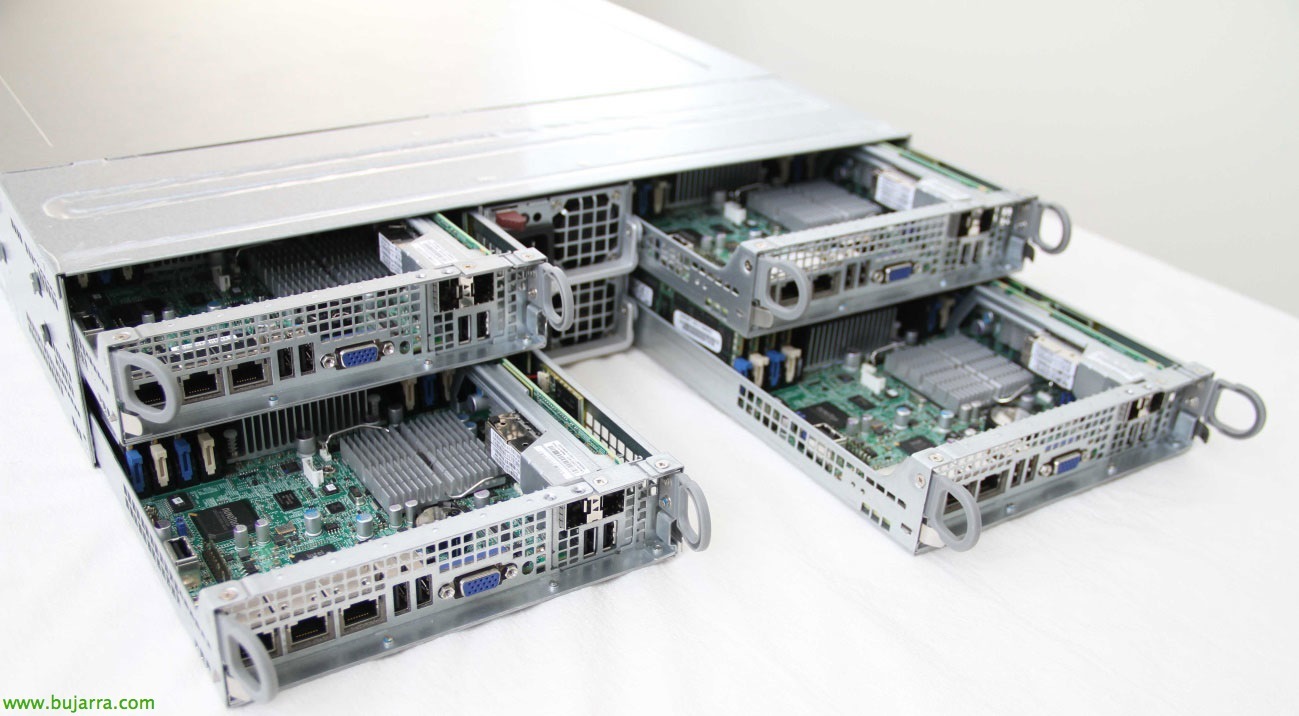
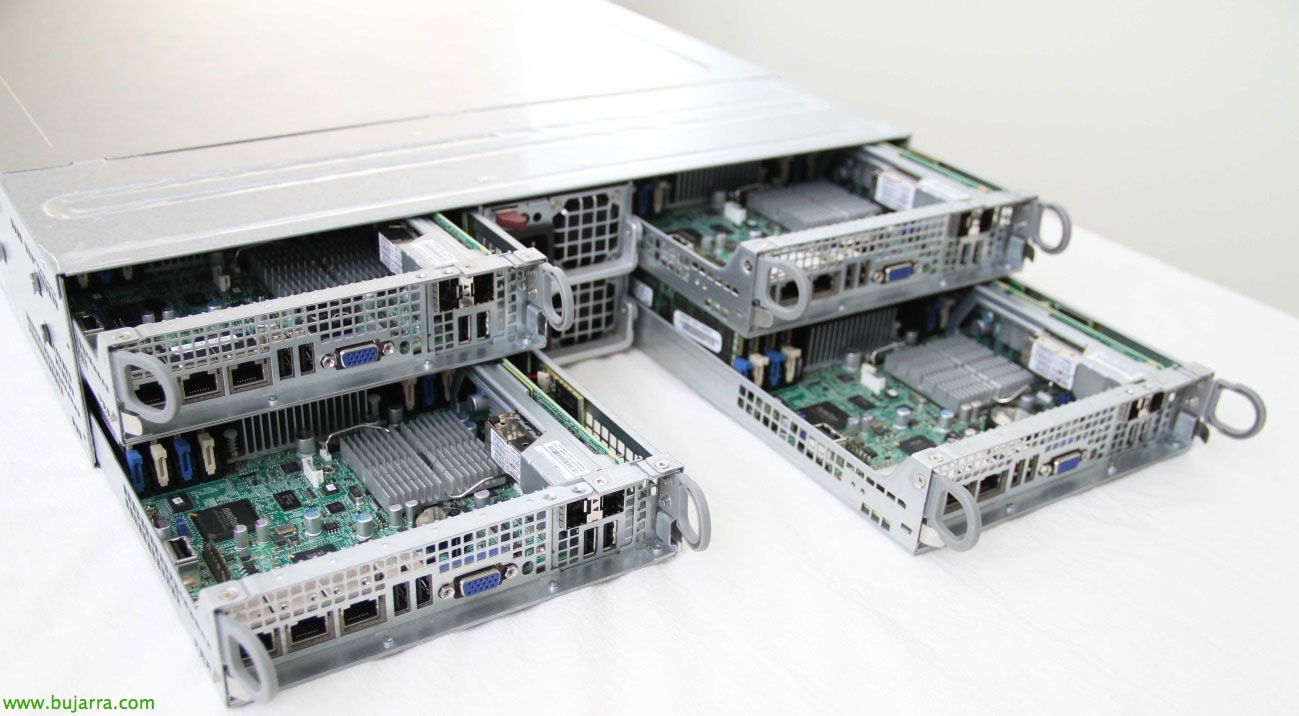
- Block: An element that will physically contain the nodes and simply provide them with electricity and ventilation. It has a chassis format that will group into 2 Or, Up to four nodes depending on the hardware model. In the image a Nutanix from the front.

From here on, Let's explain Nutanix's hardware architecture, to see what elements it is composed of and how they interrelate with each other. Nutanix is a solution that combines hardware and software elements, a Hypervisor will always be installed within each node (ESXi, KVM or Hyper-V), where a virtual machine will reside that will be the controller of Nutanix (CVM). This CVM will be where Nutanix software will be installed for both management and operation and will be in charge of sending all I/O operations to the Hypervisor and virtual machines, that is, it will be in charge of controlling all read and write operations. In the drawing below you can see the structure of a node:
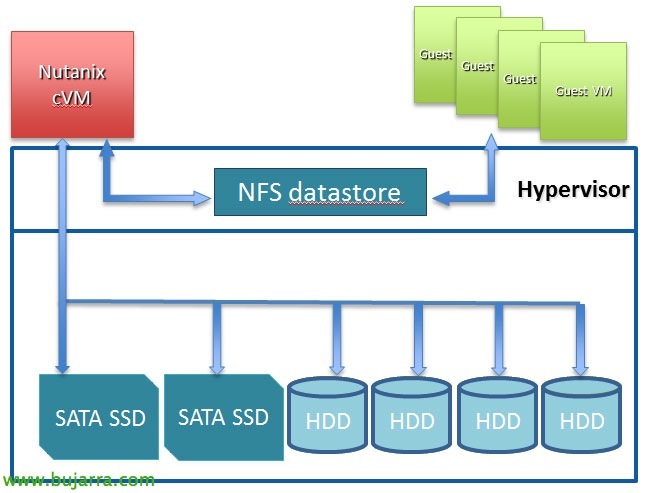
Therefore, when a group of Nutanix Nodes are put together, which will be at least three, a distributed storage platform will be formed that will be called Nutanix Distributed Filesystem (NDFS). This filesystem will be displayed to the Hypervisor as an NFS resource as if it were a storage array that publishes its contents over NFS. The most important thing is that all operations will be performed locally, that is, every virtual machine will write to the Node in which it is and in turn all the Nodes will have access to that information. Operations are performed locally in order to have the highest possible performance in read and write operations.
The Nutanix Distributed File System is made up of several basic organizational elements directly related to the Hypervisors:
- Storage Pool: It is a pool of physical SSD disks, HDD. Its function is to take the disks of each node and put them together as a global element belonging to the cluster. Typically, you can configure a single Storage Pool for the cluster of n nodes.
- Container: It is a logical segmentation of the space that has been generated in the Storage Pool and is where the vmdks or files will be stored. Containers will appear in the Hypervisor as shares NFS.
- vDisk: It is any file greater than 512 KB including vmdks or VM hard disk files from other Hypervisors, these will be stored in the Containers that have been created.

Once you know how the data is structured and how it relates to the Hypervisor, you go ahead to show how it appears in VMware:

In the next article, we'll look at how Nutanix and VMware configuration are configured.