Enabling Right-Click on Nextcloud

A feature that costs nothing to enable, is to allow users to use the right button in the Nextcloud interface, will allow you to select certain options on each file or folder. Because if you don't, the right click on the Nextcloud web interface does not show anything, go.
To do this,, we'll install an app called Files Right Click, We download from https://apps.nextcloud.com/apps/files_rightclick the version corresponding to our Nextcloud installation and place it in the Nextcloud Apps folder:
[SourceCode]MV files_rightclick-0.8.4.tar.gz /var/www/nextcloud/apps/
cd /var/www/nextcloud/apps
tar zxfv files_rightclick-0.8.4.tar.gz[/SourceCode]
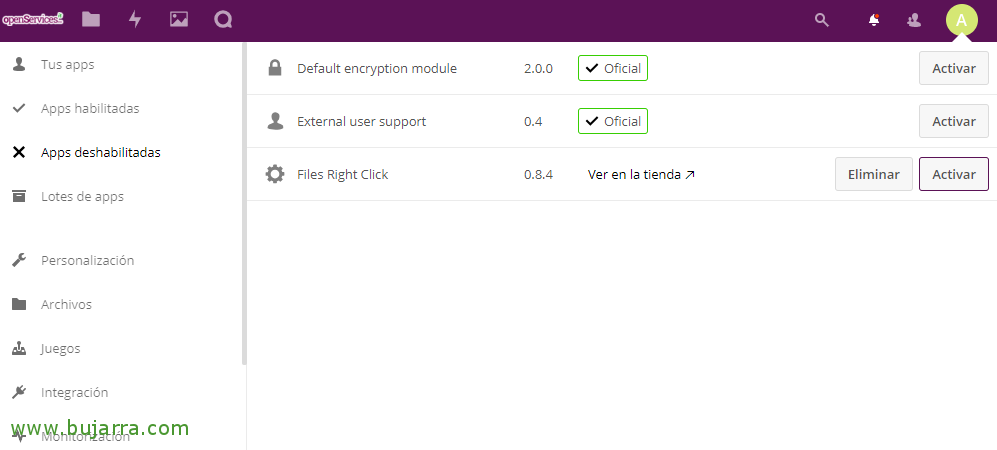
We will now be able to access the Nextcloud interface as an administrator and in “Apps” > “Disabled apps” envelope “Files Right Click” Click on “Activate”,
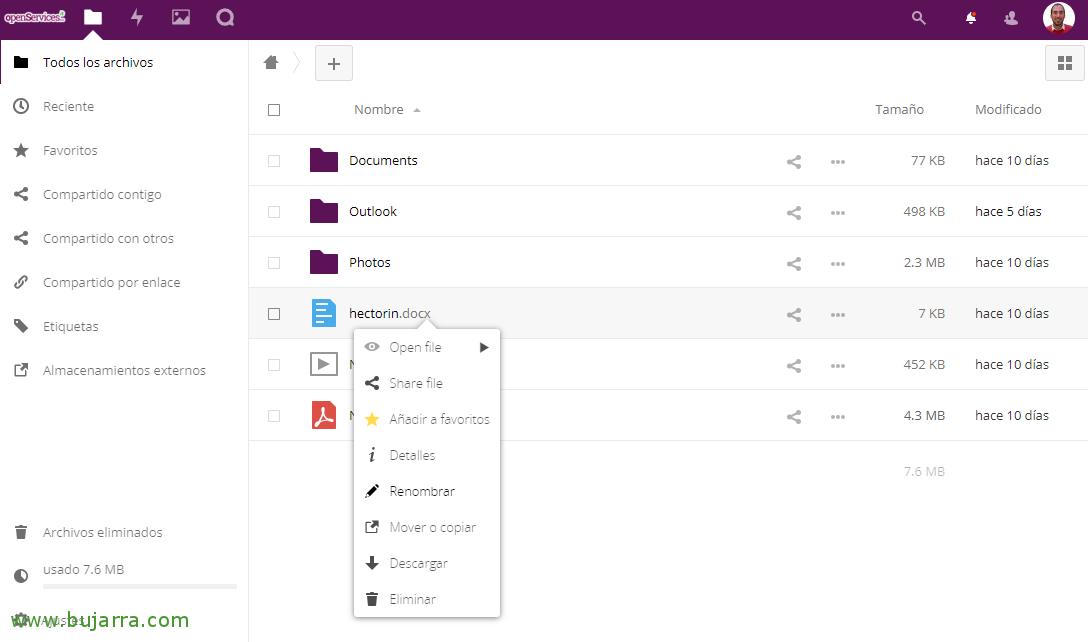
And nothing, simply once installed, Verify that on the file navigation panel we can use the right click to share, Add to Favourites, View details, rename, Move or copy, Download or delete! Much simpler for users and costs nothing to enable!