Virtualize VMware ESXi 5.0

If we need to set up a lab or need to test any new configuration before applying it to our customers' hosts, we will be able to virtualize VMware ESXi 5 and run virtual machines under these virtual hosts. In this document we will see how to dispose of this, in addition to being able to configure an EVC cluster with virtual hosts to be able to mount Storage Appliance or whatever we need,

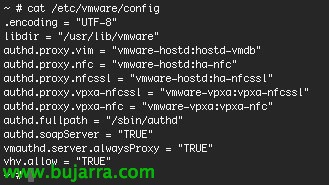
First things, on the physical hosts we will add the parameter vhv.allow = “TRUE”‘ in the file /etc/vmware/config, there will be no need to restart.

We will create a VM based on Red Hat 5.5 64bit, we will configure it with the virtual hardware we are interested in, we will specify up to 10 vNIC’s, the disks can be thin… and once created we will edit the newly generated VM and in the tab “Options” > “General Options” we will be able to specify in the version of the OS. to be “VMware ESXi 5.x”.

We must not forget that we have to allow traffic for the virtual hosts and their virtual machines by enabling promiscuous mode, we will do this on the virtual machine network where we have these virtual hosts. On the virtual switch, in the properties of the MV network, eyelash “Security” > “Promiscuous Mode” in “Accept”.

If we want these virtual hosts to be able to be added to an EVC cluster, we must first create a cluster over the physical hosts that will run them to know the CPUID characteristics and pass them to the nested hosts, we will know the type of processor, the characteristics it offers… So once the physical host cluster is created and EVC is enabled, we will go to the cluster properties > “VMware EVC” > “Current CPUID Details” and we note the values.

GOOD, now on each virtual host, we edit each MV, in “Options” > “CPUID Mask” > Mark “Keep current Advanced settings values for the Nx flag” > “Advanced…” and we introduce the processor masks that we noted. Con esto tendremos listas las máquinas virtuales para poder instalar ESXi 5.x en ellas y poder ejecutar a su vez máquinas virtuales anidadas a estos hosts virtuales.