VMware vCenter HeartBeat

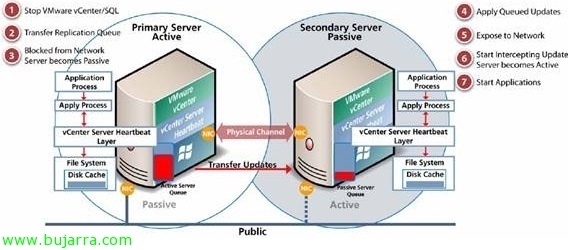
In this document, we'll look at installing and configuring VMware vCenter Heartbeat, this product allows us to obtain high availability of our VMware vCenter server in environments where it is critical, allowing application-level protection at all times, services, SQL Server if on-premises, Update Manager or if we have VMware View protecting it for use with VMware Composer. With this product we will have two vCenter servers, A primary one (active) and a secondary one (passive) where we can manually change roles (switchover) or in the event of a fall (failover) We will have high availability since the information is continuously replicated through a private network, This drop could be at the hardware level, S.O., Network Issues, vCenter application crashes or their dependencies.

Backing up VMware ESXi configuration

Once our hosts have been configured, it is advisable to keep a backup copy of their configuration, an easy way to back up the entire configuration of an ESXi host is by using the VMware vMA appliance or by using the VMware vSphere CLI (vCLI). Once we have the backup, we can restore it if necessary in a simple way, we will also see another command to reset ESXi hosts to factory values.

Using VMware Compliance Checker

The past 19 April, VMware introduced VMware Compliance Checker, a free VMware tool (written in Java) that will help us verify the security of our VMware hosts (ESX or ESXi), recommended as one of the best practices to be carried out in our environment in order to secure or detect problems, obtaining a detailed report of the recommendations to be made on each host.

Using VMware Go

Today we can see on the Shavlik website that it has been acquired by VMware, so I present to you (for those who may not know) VMware Go, that it is a tool developed by both companies in collaboration, it is free and online, that allows limited management of our VMware virtual infrastructure, it is a tool designed for new and small clients who are entering the new world of VMware and want to start with simple management. This tool has its free version (which is what we will see in this document) and the paid VMware Go Pro version which will address the shortcomings of its free version.

Using VMware Storage IO Control

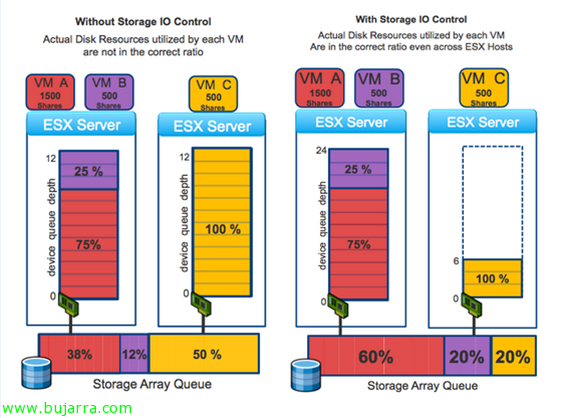
One of the new features of vSphere 4.1 is VMware Storage IO Control (SIOC) that will allow us to improve disk performance when using resource allocations on virtual machines. In vSphere we can assign different priorities to a virtual machine at the CPU level, RAM and disk; as well as CPU and RAM are prioritized only by the host that runs them, on disk access (shared) prioritize it proportionally among the rest of the hosts. Requirements: vSphere 4.1 Enterprise Plus, a single vCenter will manage the warehouses, Supported for FC and iSCSI (no NFS or RDM/RAW), Multiple Extensions Not Supported.

Forcing a MAC address on a VMware VM

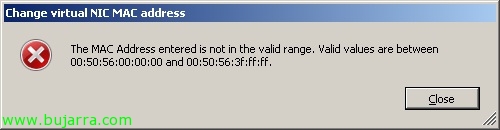
Sometimes we have the need to change the MAC address in a virtual machine, usually when we want to keep the MAC that we had on a physical computer or for reasons of applications that control it (license servers..). In this document we will see how to force a MAC address on a VM since VMware will allow us only the next range: 00:50:56:00:00:00 – 00:50:56:3F:FF:FF.

Using VMware vMA

In this document, we'll look at the VMware virtual appliance called VMware Management Assistance (VMware vMA), is based on a CentOS distribution 5.2 with vCLI, CIM, Java JRE, vSphere SDK for Perl and vSphere SDK for Java, is a script-based management appliance for our virtual environment.. VMware vMA is a great utility to replace the Service Console and be able to manage our ESXi or vCenter hosts more easily and centrally through scripts/tasks, We can configure it as a log server, Backup, ESX distribution via PXE…

Enabling Jumbo frames in VMware environments

An essential feature that we should always leave configured when working with gigabit networks is to modify the MTU value (Maximum Transfer Unit – Maximum Transfer Unit) What is the size (in bytes) of the largest data unit you can send with IP, by default, LAN networks use an MTU of 1500 bytes. On VMware and all devices that make up the gigabit ethernet network (typically the iSCSI storage network) its value must be raised to 9000 bytes, We should enable it in the storage cabin, on the switch (Some switches have it enabled by default), on VMware ESX hosts / VMware ESXi (vSwitch & Port Group) and at the NIC level on equipment that is directly connected. All this in order to take advantage of the gigabit network and be able to send larger packets.